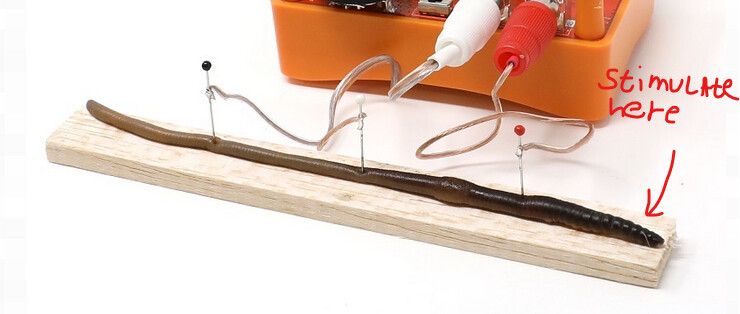
We are looking to replicate the ‘How Fast are Neurons?’ experiment with the Neuron SpikerBox and Spike Recorder Software. When recording, the signals from each of the electrodes are exactly the same. I have 2 channels on active, but the responses are exactly the same, regardless of which electrode I touch. Any help appreciated please!
It sounds like you might be running into one of a few common issues when trying to record from two different channels in SpikeRecorder. Let’s go through some troubleshooting steps and best practices to help you out:
First, let’s check your setup:
Platform: Are you using Windows, macOS, Android, or iOS?
Connection type: Are you using the green smartphone audio cable or a USB cable?
For this specific experiment (recording from two channels), it’s essential to use a USB cable.
The green smartphone cable supports only a single channel and won’t work properly in this case.
If you’re seeing a lot of noise in SpikeRecorder, it might be recording from your device’s built-in microphone instead of the SpikerBox. Try this quick test:
Clap near your device — if you see the signal graph react, then it’s likely not recording from the SpikerBox.
With a proper USB connection, you should see the USB symbol () appear in the SpikeRecorder app.
If not, try these steps in this exact order:
Turn on your SpikerBox
Launch the SpikeRecorder app
Connect the SpikerBox to your device via USB
Common experimental issues:
If both channels are recording spikes simultaneously, even when they shouldn’t, here are a few common causes:
Electrode orientation matters:
Make sure the ground pin is placed furthest from the end you’re stimulating.
And if you want to stimulate the other end, flip the pin orientation as well.
I was actually having the same issue today. In trying to troubleshoot, I completely isolated the electrodes (and even disconnected the electrode from Channel 2), but am still getting a simultaneous spike on both channel recordings in Spike Recorder whenever a stimulus is applied. For precise stimulus control I am using a dedicated pulse generator designed for nerve stimulation. Also ensured the USBc connection was working (not reading through microphone).
Any idea why both channels would be picking up on the “stimulus”? I’m wondering if there is some internal crosstalk between the channel 1 and channel 2 hardware/circuitry?
First off, sorry for the late reply, and thank you for using our products!
This is actually one of the trickiest experiments we offer, and you’re absolutely not alone. It usually takes a few rounds of fine-tuning to get everything aligned just right.
To help us get a clearer picture, could you please share more details either here or directly to our support team at [email protected]?
Helpful things include:
• a short video or photo of your setup;
• a SpikeRecorder.wav recording file showing the issue;
•anything else that you think could be useful to us;
This is a super rewarding experiment once you get it dialed in, and we’re here to help you get there.
 ) appear in the SpikeRecorder app.