Hello Backyard Brains Community!
If you have an older Muscle SpikerBox Pro or Neuron SpikerBox Pro and are having trouble connecting it to the latest version of Spike Recorder, we have a solution!
Older SpikerBox Pro boards use an HID USB connection, while the new Spike Recorder app uses a CDC serial USB connection.
The good news is that you don’t need a new board! A simple firmware update will make your existing SpikerBox Pro compatible with the latest app.
How to Update Your SpikerBox Pro
-
Download the latest Spike Recorder app for Windows or macOS from backyardbrains.com.
-
Connect your SpikerBox Pro to your computer via USB, and turn on the device.
-
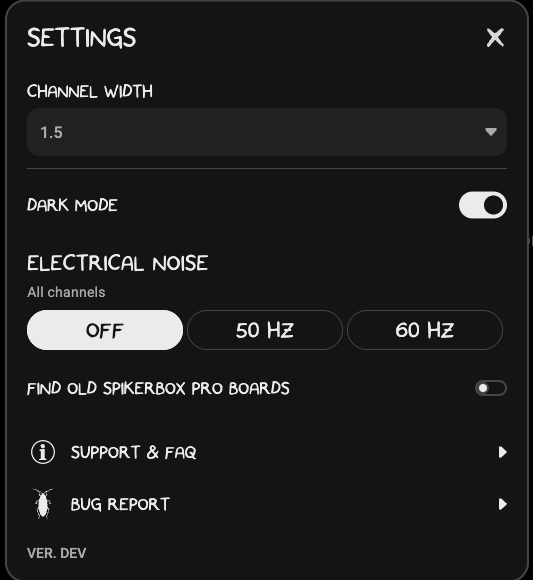
Open Spike Recorder and navigate to Settings.
-
Enable “Find old SpikerBox Pro boards”.
-
Make sure your SpikerBox Pro is powered ON, preferably with a fresh battery.
-
Once the board is detected, proceed with the firmware update. This should take approximately 10 seconds.
-
You’re all set! Your SpikerBox Pro should now work with the latest Spike Recorder app on all supported platforms.
Important: Keep your board powered ON and connected during the entire update process.
Need Help?
If your SpikerBox Pro isn’t connecting or you encounter any issues during the update, feel free to leave a comment below or contact our support team.
We’re happy to help you get your SpikerBox Pro up and running again!
Happy experimenting! 

The Backyard Brains Team